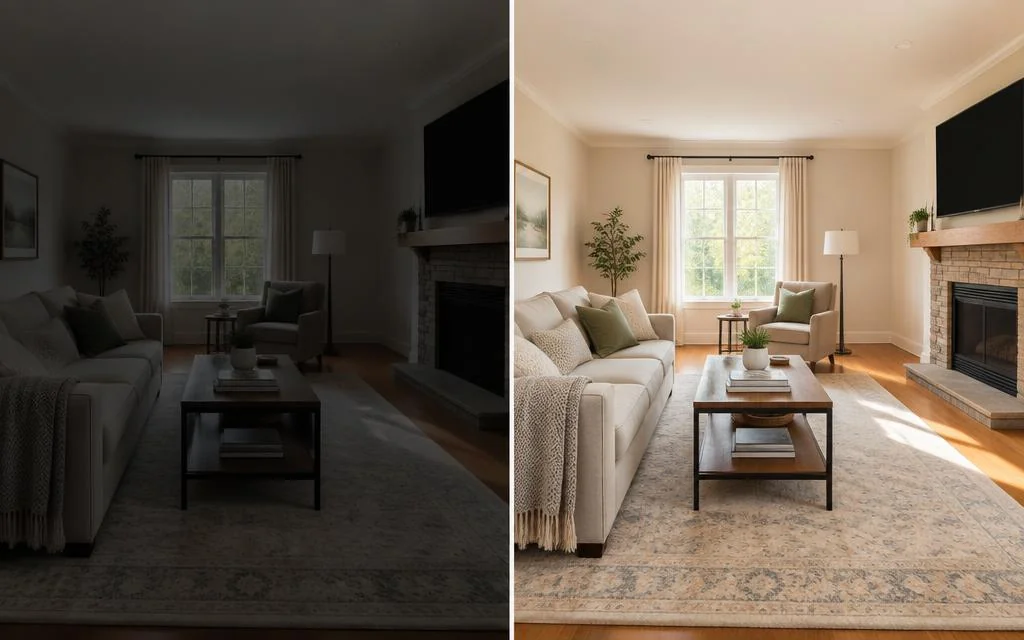
AI can enhance a listing photo — or invent a property that does not exist
A listing photo has one job: to make someone want to visit the property as it actually is. AI makes that easier — it rescues a dark room, corrects indoor lighting, straightens leaning walls.
With the same ease, it can enlarge a room, replace a view or erase a crack. Nothing in the technology separates those uses. The difference is a decision, taken before opening the tool.
Why the line between enhancing and transforming matters
Three reasons, none abstract.
The viewing: a buyer who does not recognise the property stops trusting the listing and the agency within a minute.
Wasted effort: images that oversell bring visits from people who were never going to buy.
Reputation: an edit hiding a defect is discovered at the worst moment.
Enhance the photo, not the property. Everything below applies that one line.
1. Photo enhancement: what can be corrected
These corrections bring the image closer to what the eye sees on site. They are safe because they change the photograph, not the home.
- Exposure, for a room the camera recorded darker than it looks.
- White balance, removing the yellow of lamps or the green of strip lighting.
- Highlight recovery, restoring the garden behind a bright window.
- Shadow detail, opening a dark corner without flattening the image.
- Perspective, straightening walls bent by a wide phone lens.
- Sharpness and noise reduction, kept moderate.
- Consistency across the set, so every room matches.
Applied with restraint, none of these mislead. Pushed to an extreme — studio lighting, colours that do not exist in daylight — even a legitimate correction overstates.
What true-to-property editing should never change
The prohibited list is short and non-negotiable.
- Architecture and proportions: never widen a room, raise a ceiling or move a wall.
- Materials: no replacing a floor, a worktop or a facade.
- Defects: cracks, damp marks, stains and wear stay visible.
- Fixed equipment: radiators, boilers, meters and pipes remain.
- The view: no removing a neighbouring building or a road, no adding a sea view or a sunny sky.
- Blinds, curtains and shutters: exactly as photographed, never opened to invent light or a view.
If an edit changes what the buyer finds at the viewing, it is out of bounds.
2. Virtual decluttering: how far to go
Decluttering removes objects, so it is no longer photographic correction and needs its own rules.
Reasonable to remove: bins, drying racks, personal photos, clutter, cables. These leave with the occupant.
Never to remove: anything fixed or structural — a radiator, a boiler, a meter, a crack, a damp patch.
The test is simple. If the item leaves with the seller, removing it is presentation. If it stays, removing it is concealment.
3. Virtual staging: helping buyers project without faking reality
Virtual staging adds furniture to an empty room. Empty rooms read as smaller and colder, and buyers struggle to judge what fits.
Done properly, staging keeps furniture realistic for the room size, uses light decor rather than a showroom, and never blocks doors, windows, balconies or exits. It never covers a defect.
It is a visualisation, not a photograph of the property. Label it, every time.
AI hallucinations in a property context
Generative models invent. Asked to fill an area, they produce something plausible rather than true: a window on a blank wall, a door leading nowhere, a floor pattern that does not exist.
Plausible is the problem. These errors look fine at a glance and are caught on site — exactly when they damage trust.
How to reduce hallucinations
Practical measures that work.
- Prefer corrective processing — light, colour, geometry — over regenerating an area.
- Keep generative use to bounded tasks: removing a listed object, furnishing an empty floor.
- Review every processed image at full size, not as a thumbnail.
- Compare each result against the original before publishing.
- Redo rather than accept an oddity you cannot explain.
A defined order helps: enhancement, then decluttering, then staging, each reviewed separately.
Why you should always keep the original
The original is your evidence. It shows what the camera recorded before processing, which protects the agent as much as the buyer.
Archive it beside every published version, and link any decluttered or staged image back to it so anyone can see what changed.
Original, enhanced, decluttered, virtually furnished
Four versions of the same photo, four meanings.
- Original: what the camera recorded, kept but not published.
- Enhanced: corrected for light, colour and geometry. Publishable, no label.
- Decluttered: temporary objects removed. Labelled, original linked.
- Virtually furnished: furniture added to an empty room. Labelled as a visualisation, original linked.
Naming these versions removes the ambiguity: everyone knows which one is on the portal and why.
Checklist before publishing an AI-edited photo
Run through this before anything goes live.
- Same dimensions and layout as the original?
- Materials and surfaces unchanged?
- Visible defects still visible?
- Fixed equipment still in place?
- Blinds, curtains and shutters as photographed?
- Is the view through the windows the real one?
- Was anything removed the occupant's own?
- Is added furniture realistic and clear of exits?
- Is the image labelled if its content changed?
- Is the original archived and linkable?
A no anywhere means another pass.
A responsible workflow for an agency
Turn the principles into a routine.
- 1
Shoot honestly
: every room, defects included.
- 2
Enhance the full set
with the same settings.
- 3
Declutter only where needed
, using the leaves-with-the-seller test.
- 4
Stage only empty rooms
, labelled as visualisations.
- 5
Review at full size
against the originals.
- 6
Publish with labels
, originals archived.
Write it down once and every agent applies the same standard, new joiners included.
How EstatePic applies this approach
EstatePic is built around one rule: enhance the photo, not the property.
Enhancement corrects light, colour and geometry in a fixed order. Decluttering and virtual staging are separate modes, staging presented as a visualisation. The original stays beside every result, one credit per photo.
The aim is to stop a good property being passed over because of a dark, crooked phone photo. Designed to support truthful property presentation.
Conclusion
Editing a listing photo is legitimate. Rebuilding the property in the photo is not.
Correct light, colour and lines freely. Leave architecture, materials, defects, fixed equipment, window coverings and the view alone. Keep decluttering and staging separate and labelled.
Do that consistently and your photos bring the right buyers to the door — and the property they find is the one they saw.
FAQ
Can you edit real estate photos with AI?
Yes, for photographic corrections: exposure, white balance, highlight recovery, shadows, perspective, sharpness and consistency across a shoot. These bring the image closer to what the eye sees on site.
Which edits are acceptable on a listing photo?
Anything correcting the photograph rather than the property: light, colour, geometry and sharpness. Architecture, proportions, materials, defects, fixed equipment, the view, and blinds, curtains and shutters stay unchanged.
Can you remove objects from a real estate photo?
Only items that leave with the occupant: bins, drying racks, personal photos, clutter, cables. Anything fixed or structural — radiators, meters, pillars, cracks, damp marks — must stay visible.
What is virtual decluttering?
Removing temporary personal belongings from a photo of an occupied home so the property is easier to see. It changes the image content, so it should be labelled and the original kept available.
What is virtual staging?
Adding furniture to a photo of an empty room so buyers can judge scale and use. Furniture stays realistic in size, never blocks doors, windows or exits, and never covers a defect.
Should virtually furnished images be labelled?
Yes. A virtually furnished photo is a visualisation, not a photograph of the property as it stands. Label it clearly and link it to the original image.
How do you avoid AI hallucinations in listing photos?
Prefer corrective processing over regeneration, keep generative work to bounded tasks, review every image at full size against the original, and redo anything with a detail you cannot explain.
Enhance your listing images with EstatePic while keeping the property true to reality.
See pricingWant to apply these tips in minutes? Try AI real estate photo editing that keeps the property true to life, see how agencies share one photo workspace, or compare photo editing plans and prices.